Panduan Filter L-Pad Crossover Audio: Fungsi dan Implementasi
Pelajari fungsi penting filter L-Pad dalam menjaga impedansi konstan dan menyeimbangkan level driver tweeter. Panduan praktis menggunakan fitur kalkulator di Speaker Box Lite.
Pengantar Filter L-Pad (L-Pad) dalam Crossover Audio
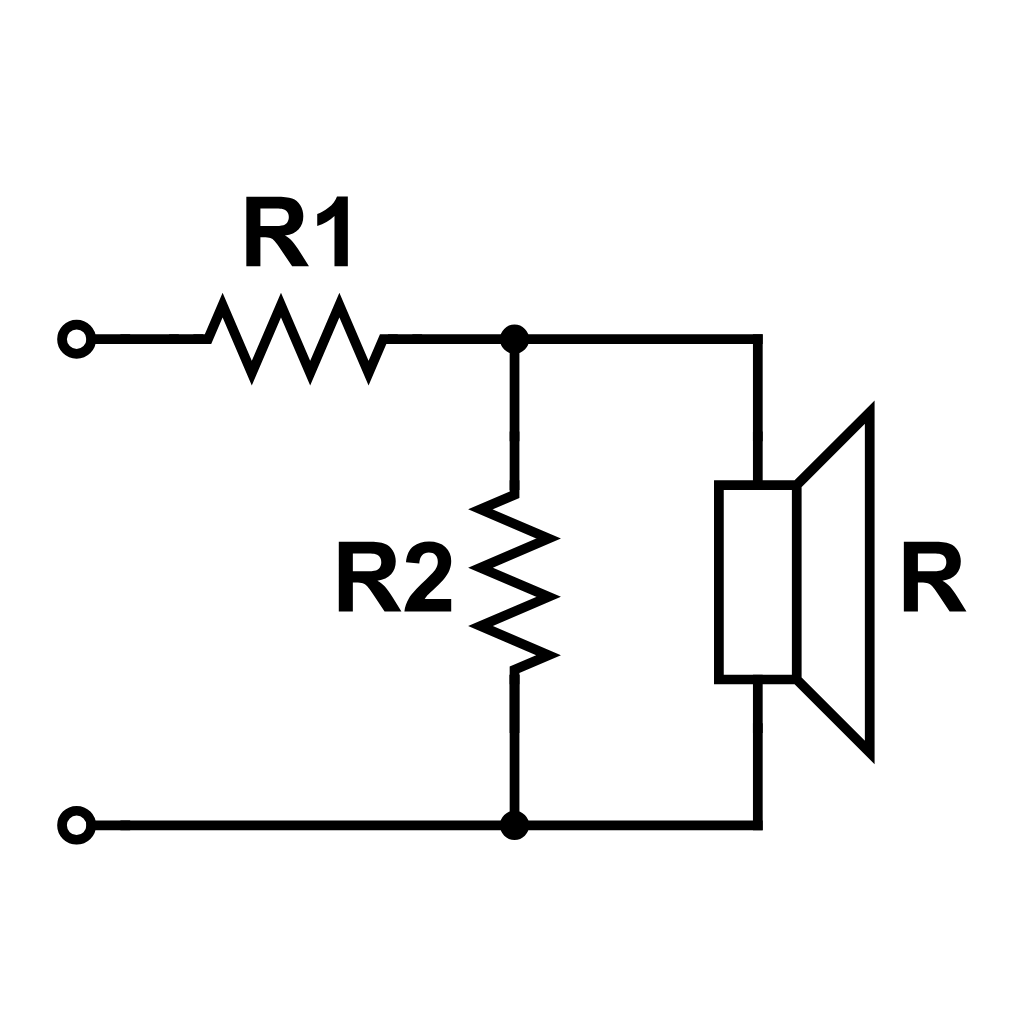
Attenuator L-Pad (L-Pad) adalah sirkuit khusus yang digunakan dalam Jaringan (Network) crossover pasif untuk mengurangi tingkat output driver - biasanya tweeter yang sensitif - agar sesuai dengan sistem lainnya. Berbeda dengan resistor seri sederhana, yang mengubah total Impedansi (Impedance) dan menggeser frekuensi crossover yang diinginkan, L-Pad (L-Pad) menggunakan konfigurasi resistor ganda. Dengan menempatkan satu resistor secara seri dan satu lagi secara paralel dengan driver, L-Pad (L-Pad) melemahkan sinyal sambil mempertahankan Impedansi (Impedance) yang konstan. Ini memastikan filter crossover terus beroperasi tepat seperti yang dirancang, memberikan performa yang stabil dan suara yang seimbang.
Skema rangkaian atenuator L-Pad (L-Pad) untuk penyesuaian level Impedansi (Impedance) konstan pada crossover speaker
Manfaat Utama Filter L-Pad (L-Pad) dalam Sistem Audio
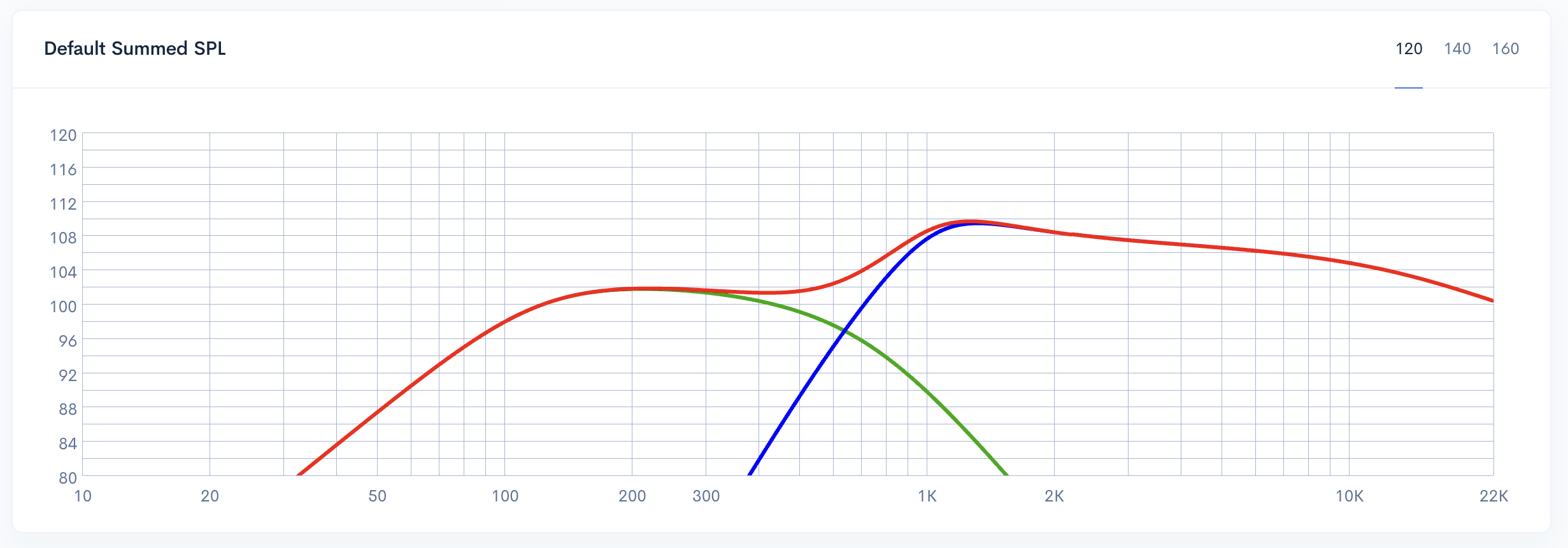
Alasan utama para teknisi audio dan perakit DIY menggunakan filter L-Pad (L-Pad) adalah untuk mencapai penyelarasan level yang mulus antara driver dengan peringkat sensitivitas yang berbeda-beda. Dalam banyak desain pengeras suara, tweeter frekuensi tinggi jauh lebih efisien daripada woofer - sering kali selisih beberapa desibel. Tanpa atenuasi, tweeter akan mendominasi rentang midrange dan bass, sehingga menciptakan profil akustik yang tidak seimbang. L-Pad (L-Pad) memungkinkan pelemahan yang presisi pada driver berefisiensi tinggi agar sesuai dengan unit yang memiliki efisiensi lebih rendah. Dengan menjaga Impedansi (Impedance) tetap konstan, filter ini memastikan bahwa pengurangan level terjadi tanpa menggeser titik crossover atau mengganggu respons frekuensi filter yang direncanakan.
Grafik respons SPL gabungan yang mengilustrasikan ketidaksesuaian output frekuensi tinggi akibat sensitivitas tweeter
Menjaga Stabilitas Crossover melalui Impedansi (Impedance) Konstan
Kemiringan filter dan Frekuensi Cutoff (Frequency Cutoff) crossover pasif terikat secara matematis dengan Impedansi (Impedance) beban spesifik dari driver. Jika Impedansi (Impedance) tersebut diubah - misalnya, dengan menggunakan resistor seri sederhana - titik crossover akan bergeser, mengakibatkan anomali respons frekuensi atau masalah fase. L-Pad (L-Pad) mengatasi masalah ini dengan memanfaatkan Jaringan (Network) resistor ganda. Konfigurasi ini memastikan bahwa Jaringan (Network) crossover selalu "melihat" beban nominal yang sama tanpa mempedulikan tingkat atenuasi. Dengan menjaga Impedansi (Impedance) konstan ini, kemiringan filter yang dituju tetap stabil, memungkinkan padding yang presisi tanpa mengorbankan penyetelan elektrik sistem.
Melindungi Komponen Sensitif
Selain menjaga Impedansi (Impedance), L-Pad (L-Pad) berfungsi sebagai perlindungan kritis bagi driver frekuensi tinggi. Tweeter pada dasarnya halus dan rentan terhadap kegagalan termal jika terpapar daya berlebih. Dengan mengarahkan sebagian besar energi listrik ke Jaringan (Network) resistor, L-Pad (L-Pad) memungkinkan manajemen distribusi daya yang presisi. Konfigurasi ini memastikan bahwa output frekuensi tinggi dikalibrasi untuk menyesuaikan dengan sensitivitas woofer tanpa membebani voice coil driver secara berlebihan. Akibatnya, desainer dapat mencapai profil sonik yang seimbang sambil melindungi komponen sensitif dari risiko mekanis dan termal yang terkait dengan sinyal output tinggi.
Kasus Penggunaan Umum untuk Atenuasi L-Pad (L-Pad)
Filter L-Pad (L-Pad) paling sering digunakan untuk menyesuaikan sensitivitas driver yang berbeda dalam satu kotak multi-driver. Dalam sistem 2-way standar, tweeter frekuensi tinggi sering kali menunjukkan sensitivitas yang lebih tinggi daripada woofer pasangannya; L-Pad (L-Pad) memungkinkan atenuasi yang presisi untuk meratakan tingkat output. Untuk desain 3-way, filter ini sangat penting untuk menyeimbangkan driver mid-range terhadap nada rendah dan tinggi guna memastikan respons frekuensi yang kohesif. Selain itu, L-Pad (L-Pad) sering digunakan pada monitor studio dan pengaturan home theater untuk menyesuaikan "kecerahan", yang memungkinkan desainer untuk menyempurnakan respons frekuensi tinggi berdasarkan akustik ruangan tertentu atau preferensi mendengarkan.
Cara Menggunakan Alat L-Pad (L-Pad) di Speaker Box Lite
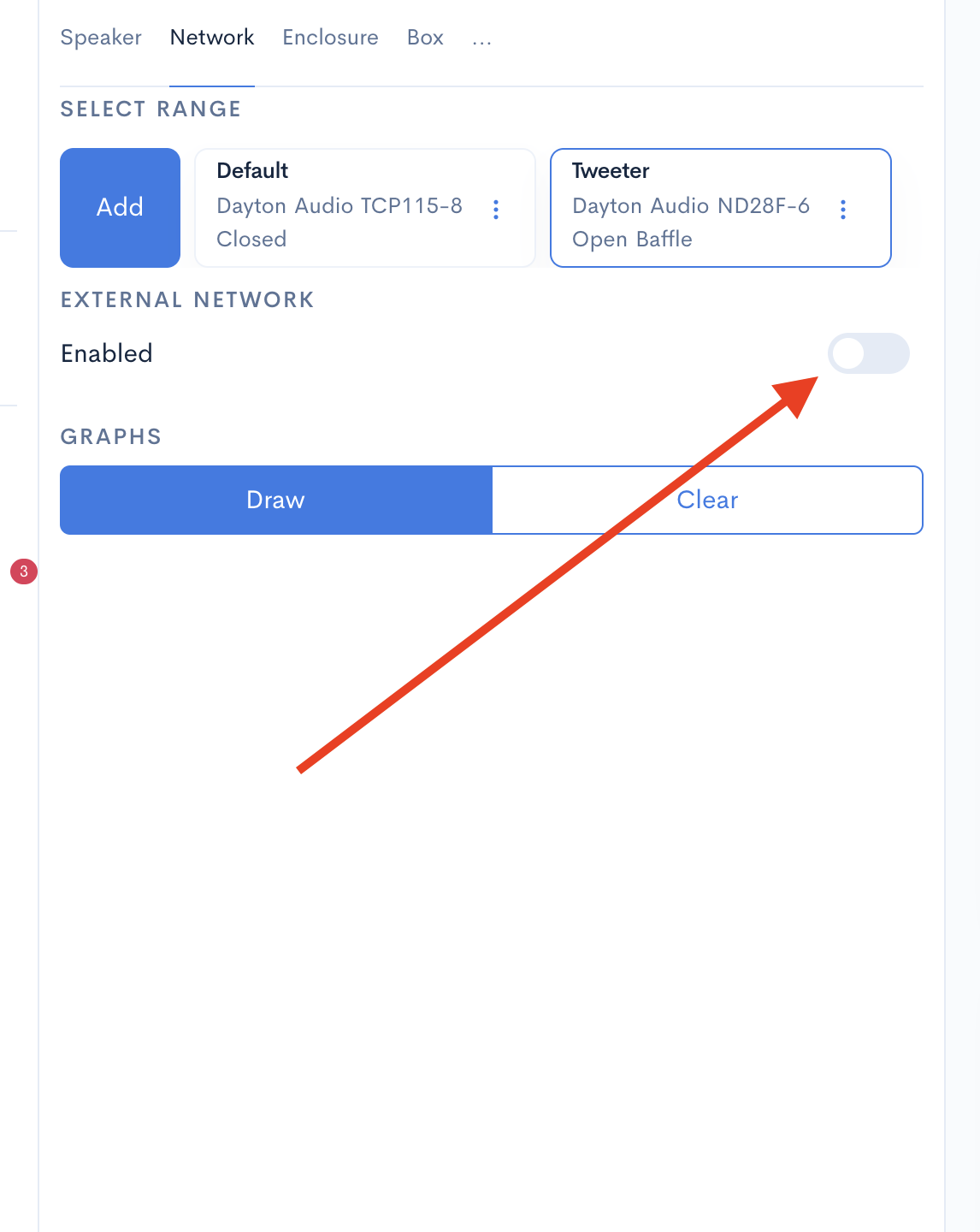
Mengintegrasikan filter L-Pad (L-Pad) di dalam Speaker Box Lite adalah proses yang disederhanakan yang terletak di dalam modul desain crossover. Untuk memulai, navigasikan ke tab Jaringan (Network) dan aktifkan toggle "Jaringan eksternal (External network)". Setelah aktif, klik tombol Tambah filter (Add filter) dan pilih "L-Pad (L-Pad)" dari daftar komponen jaringan yang tersedia.
Entri L-Pad (L-Pad) baru akan muncul di bawah bagian "Filter lainnya (Other filters)". Untuk mengonfigurasinya, klik langsung pada item L-Pad (L-Pad) atau pilih tombol "..." jika Anda menggunakan versi web. Tindakan ini membuka layar parameter, di mana Anda dapat memasukkan data spesifik untuk menghitung nilai resistor yang diperlukan untuk rangkaian Anda.
Mengaktifkan toggle Jaringan eksternal (External network) di modul crossover Speaker Box Lite
Mengonfigurasi Bidang Input: Impedansi (Impedance), Amplitudo, dan Daya
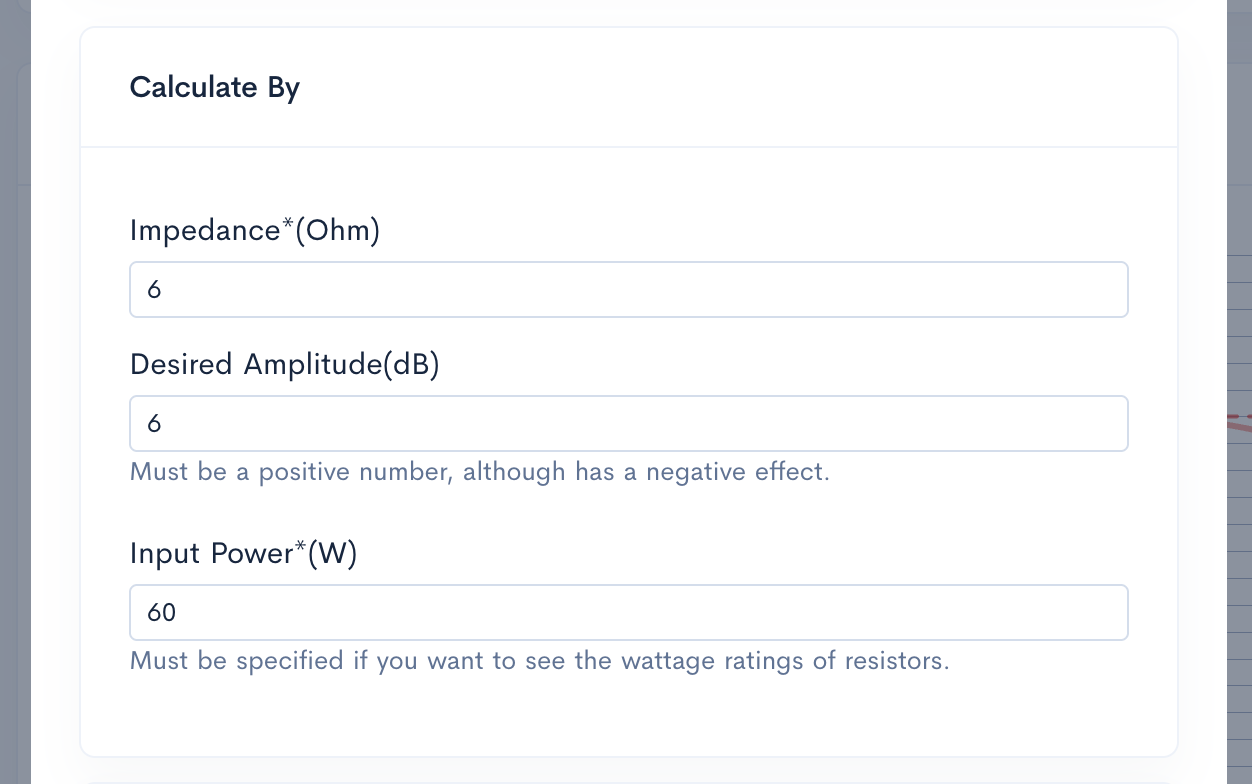
Untuk mengonfigurasi L-Pad (L-Pad), Anda harus terlebih dahulu menentukan **Impedansi (Impedance)**, yang mewakili beban nominal driver Anda - biasanya 4 atau 8 Ohm. Input Impedansi (Impedance) yang akurat memastikan frekuensi crossover tetap stabil dengan menjaga beban tetap konstan. Selanjutnya, masukkan **Amplitudo yang Diinginkan (Desired Amplitude) (Db)** untuk menentukan tingkat atenuasi tepat yang diperlukan untuk menyeimbangkan driver Anda. Terakhir, berikan **Daya Input (Input Power)** yang akan ditangani oleh crossover. Nilai ini sangat penting untuk menghitung output **W1** dan **W2**, karena nilai ini menentukan rating watt yang diperlukan untuk resistor Anda guna memastikan disipasi panas yang aman selama pengoperasian.
Parameter input L-Pad (L-Pad) untuk Impedansi (Impedance), Amplitudo yang Diinginkan (Desired Amplitude), dan Daya Input (Input Power) di Speaker Box Lite
Menafsirkan Nilai Output: R1, R2, W1, dan W2
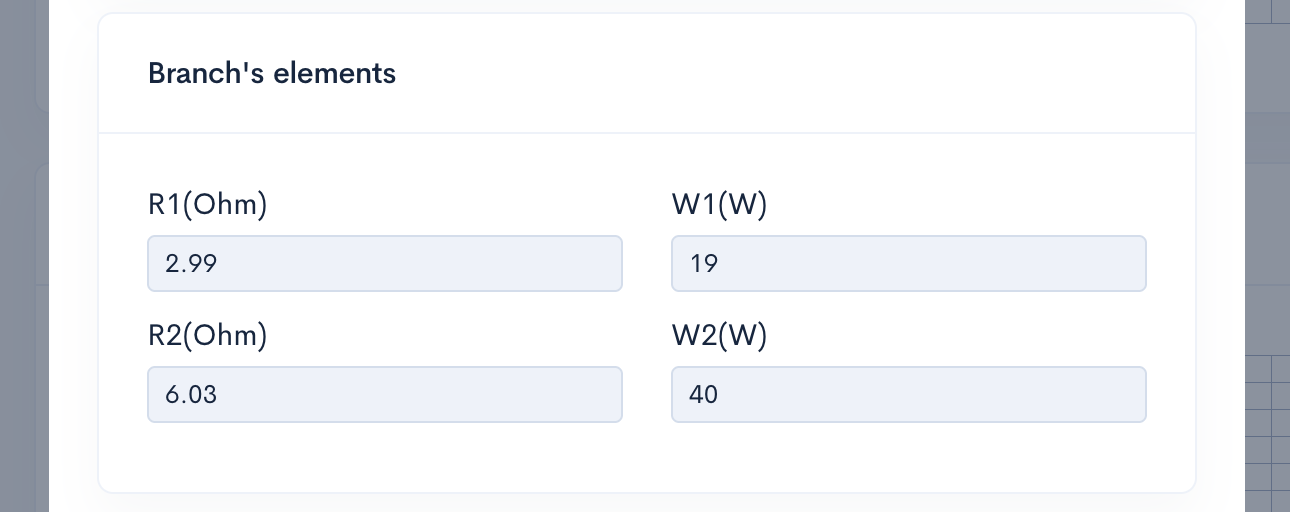
Setelah parameter input Anda dikirimkan, Speaker Box Lite secara otomatis menghitung nilai komponen yang diperlukan. R1 mewakili resistor seri yang ditempatkan langsung di jalur sinyal, sementara R2 mengidentifikasi resistor paralel yang terhubung di seluruh driver. Bersama-sama, nilai-nilai ini memastikan pelemahan yang diinginkan sambil mempertahankan beban impedansi (Impedance) yang stabil.
Sama pentingnya adalah output W1 dan W2. Nilai-nilai ini menentukan peringkat daya minimum - atau watt - yang diperlukan untuk setiap resistor. Mematuhi perhitungan ini sangat penting untuk mencegah kegagalan termal, karena resistor yang ukurannya tidak memadai dapat mengalami panas berlebih dan gagal saat menangani sinyal audio berdaya tinggi.
Nilai output L-Pad (L-Pad) untuk resistansi R1-R2 dan peringkat daya W1-W2
Penyetelan Lanjutan dengan Mode Elemen kustom (Custom elements)
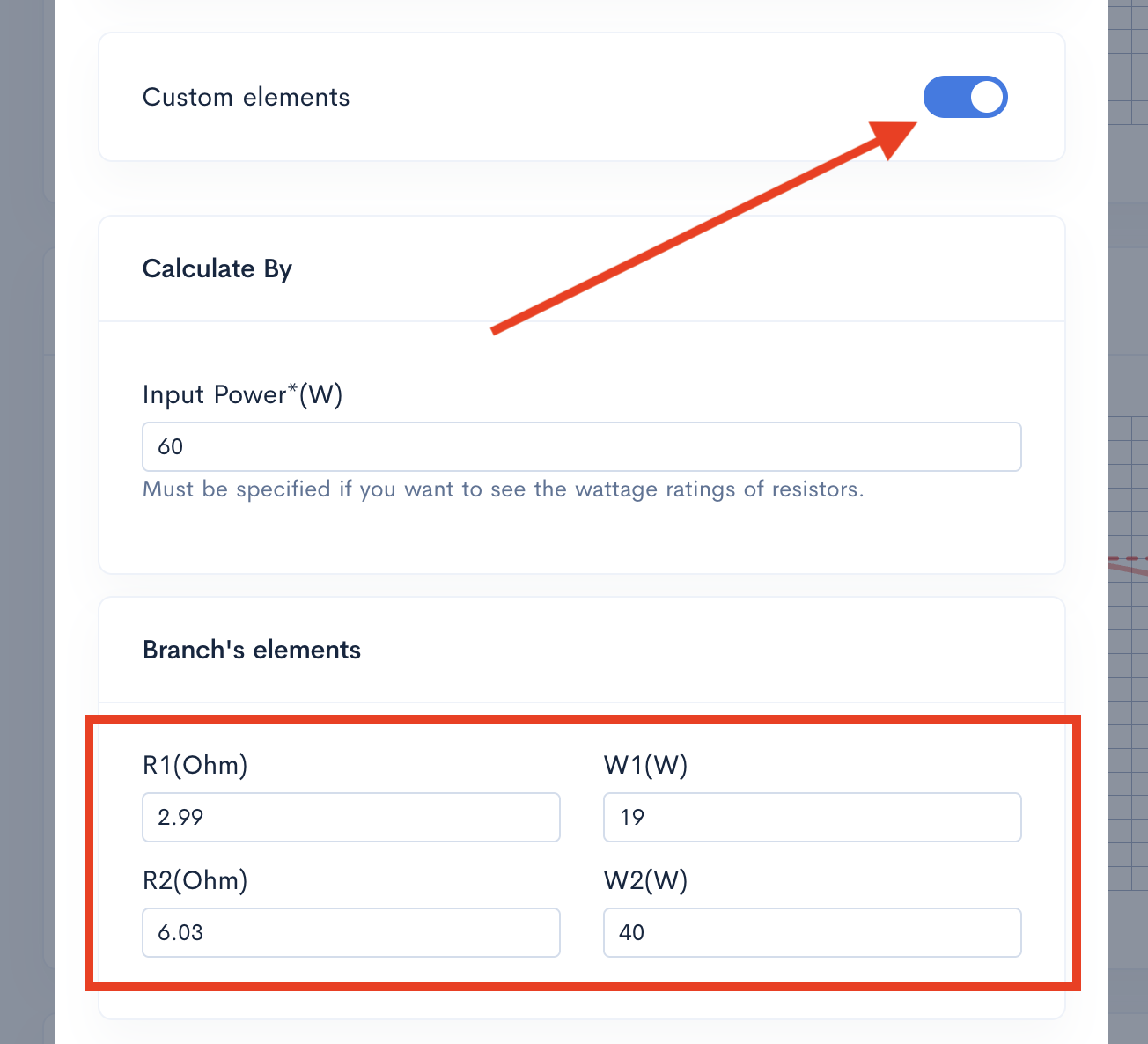
Mode "Elemen kustom (Custom elements)" di Speaker Box Lite menjembatani celah antara desain teoretis dan ketersediaan perangkat keras di dunia nyata. Meskipun kalkulator sering kali memberikan nilai teoretis yang presisi - seperti 4,62 Ohm - resistor fisik biasanya dijual dalam peningkatan seri-E standar seperti 4,7 Ohm. Dengan mengaktifkan mode ini, Anda dapat mengganti angka yang dihitung secara manual dengan komponen spesifik yang Anda miliki. Perangkat lunak kemudian secara otomatis menghitung ulang atenuasi dan Impedansi (Impedance) aktual yang dihasilkan. Hal ini memungkinkan Anda melihat dampak nyata dari toleransi komponen dan memastikan rakitan crossover akhir Anda bekerja sesuai harapan.
Antarmuka Mode Elemen kustom (Custom elements) Speaker Box Lite untuk penyesuaian manual nilai resistor L-Pad (L-Pad)
Alur Kerja Praktis: Merancang Crossover HF yang Stabil
Untuk merancang crossover HF yang stabil, mulailah dengan mengukur sensitivitas tweeter Anda relatif terhadap woofer untuk menentukan atenuasi yang diperlukan dalam dB. Di Speaker Box Lite, buka alat L-Pad (L-Pad) dan masukkan impedansi (Impedance) nominal driver beserta penurunan dB yang telah dihitung. Selanjutnya, tentukan total daya input (Input Power) sistem Anda. Perangkat lunak ini secara instan memberikan nilai resistansi yang diperlukan - R1 dan R2 - ditambah peringkat daya minimum - W1 dan W2. Alur kerja ini memastikan komponen Anda menangani beban termal sambil tetap mempertahankan pencocokan level yang tepat yang dibutuhkan untuk soundstage yang seimbang.
Can you explain the height, width, and length of the port?
Can you please explain the height, width, and length of the port? I have changed the height of the port to different numbers but the 3d rendering does not show any changes. I don't understand. When I go to view the parts, none of the dimension change. What part of the port does height and width signify?